Basic Clash Detection Bundle
BundleBundle
Core clash checking tools for everyday model coordination.
Datacomp IT · Version 1.3 · 32/64 bit
Clash Detection is a practical, user-friendly tool for identifying geometric conflicts within a single IFC model or across several coordinated models. It helps teams review the exact location of each clash, focus on the most important issues and export clear results for further coordination in Microsoft Excel, BCF or BIMvision Gallery.
See it in action
Explore the interface and watch Clash Detection working inside BIMvision.
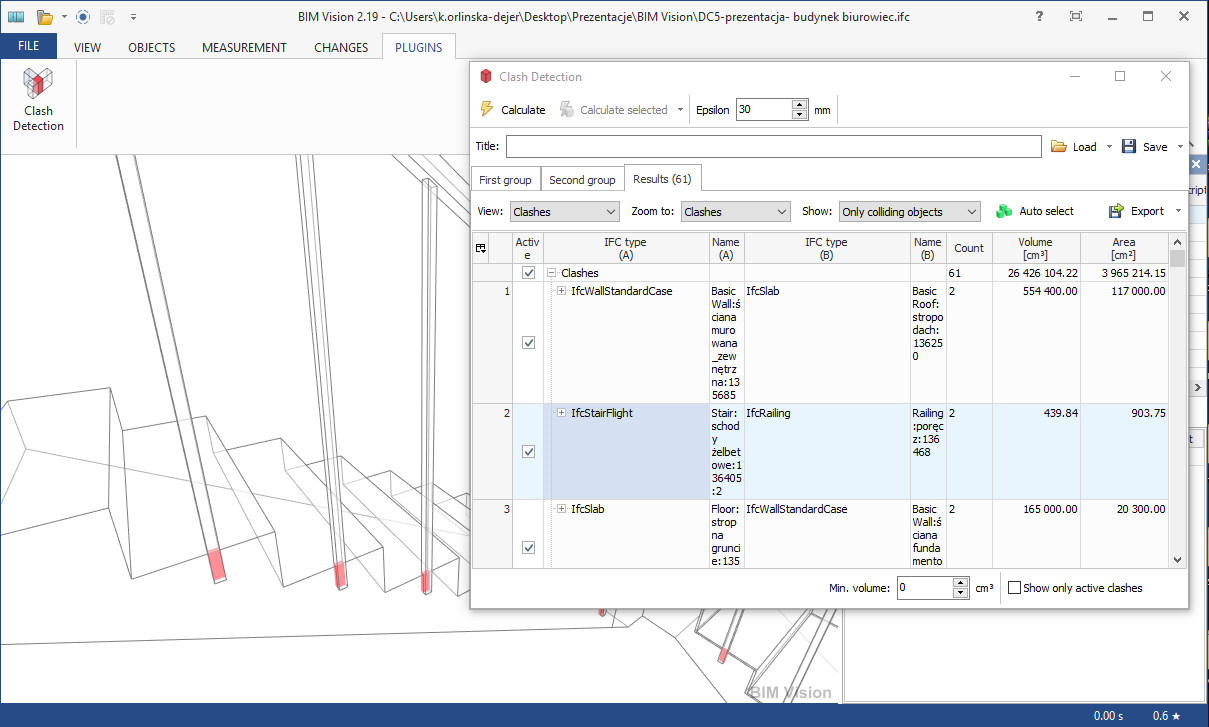
Define which models and elements should be checked.
About this plugin
Clash Detection supports the identification, inspection and reporting of interference in BIM models. Finding issues during coordination reduces the risk of rework, project losses and construction delays.
The plugin can examine elements within a single IFC file or compare independent models in one coordinated workflow. Teams can check every object, work only with active or selected elements, create a custom selection from model properties, or use a prepared object list. Projects involving more than two models can extend the workflow with the Multifile Module.
Search settings help reviewers concentrate on relevant results. Epsilon controls how overlapping geometry is interpreted, while the minimum-volume option filters out minor intersections. Each detected clash can be opened directly in the model, making the exact location and relationship between affected elements easier to understand.
Results remain useful after the review. Detected clashes can be organized and exported to Microsoft Excel, exchanged in BCF through IFC Comments, or preserved as visual records in BIMvision Gallery for clear communication with the wider project team.
Continue exploring
Compare related products built for the same BIM workflow.
Bundle
Core clash checking tools for everyday model coordination.
Bundle
Advanced clash detection and coordination tools in one package.
Bundle
A complete coordination, reporting and IFC toolkit.